Retail accessibility guidance often focuses on helping shoppers navigate an ecommerce experience and compare product attributes such as size, fit, color, materials, and dimensions before adding an item to their cart.
Beauty ecommerce introduces an additional challenge. Shoppers still need to navigate the website and checkout process, but they also need access to product details that are often communicated visually. Shade family, undertone, finish, texture, formula, wear, and how a product may look across different skin tones all need to be conveyed meaningfully in text.
That challenge becomes especially clear in four areas: shade-matching tools, virtual try-on experiences, ingredient and allergen information, and tutorial videos.
Why generic retail accessibility guidance breaks down for beauty
A beauty product detail page can pass a standard accessibility audit and still leave customers with disabilities without the information they need. Alt text, keyboard navigation, and an accessible checkout do not necessarily replace the information sighted shoppers gather visually.
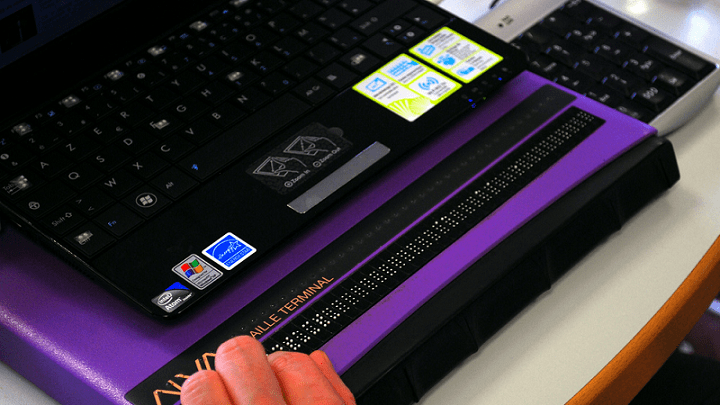
For a blind shopper, product details such as shade family, undertone, or finish should be described in text. Additionally, tactile packaging, embossing, Braille, distinctive shapes or textures, and even scent can help a blind person identify and organize makeup independently after purchase. Because physical packaging characteristics matter to a blind customer when using the product, they also matter when that customer is deciding what to buy. Blind content creator and accessibility advocate Molly Burke explains this in her Allure article about her relationship with beauty; read it here.
Read this blog for a basic e-commerce website accessibility guide, including ADA and WCAG best practices.
How Shade-matching tools break down for screen reader users
A shade finder is a tool on a beauty website that helps shoppers choose the right shade of a product, usually foundation, concealer, or tinted skincare.
A shade finder that announces something like “210N” may technically return a result to a screen reader. But unless the shopper already knows the brand’s shade system, that label may not provide enough information to make a purchase.
A useful text description should include the same kinds of details a sighted shopper would use to compare shades: undertone, depth, finish, and how one shade differs from another in the line. Emily Davison, a blind beauty writer and blogger at Fashioneyesta, has made a similar point directly to brands, recommending detailed descriptions of shade ranges and colors rather than relying on shade names alone.
As part of the research for this article, we asked one of our blind screen reader users to test shade finders on several popular beauty websites. On one major beauty retailer’s site, the shade finder had two accessibility problems.
First, when the result appeared, the screen reader announced it, but focus did not move into the result modal. The user had to manually find and open the modal before they could review the recommendation or act on it.
Second, when the tool could not find a suitable match, several unlabeled images appeared in the modal’s navigation sequence. A screen reader user could encounter those images without any information about what they represented or whether they were relevant to the next step.
The tool on this site was technically possible to complete. Yet both issues introduced unnecessary guesswork at the point when the shopper was trying to understand the result.
On another well-known beauty brand’s site, the shade finder introduced a different barrier. At one point, the instructions dictated that our blind user center their face inside a visible circle on the screen. For a blind shopper, that instruction provided no usable way to complete the step independently.
Our tester eventually got through it by trial and error, but the tool offered no nonvisual guidance to help them position their face correctly. So, this shade finder was ultimately usable, but only after the shopper worked around a step that relied entirely on sight.
Finally, two of the four main beauty websites we tested prompted users to select their exact skin tone from a set of images. The images included some descriptive labels, but they could not be selected or activated as independent web elements.
According to our screen reader user, on one site there was also no indication of which shade image the user had selected. Focus, unlabeled images, visual-only instructions, selecting options, and knowing which option is selected are as important as good color descriptions for beauty accessibility.
A shade-matching tool may seem accessible when its individual elements are tested, yet still break down when someone tries to complete the full task.
Virtual try-on and AR features with no keyboard or screen reader path
WCAG requires website functionality to work by keyboard alone, including controls within interactive tools. Virtual try-on experiences also need to communicate instructions, selections, changes, and results in ways that do not depend on sight.
Virtual Try-On Experience on Site 1
On one virtual try-on tool, the experience became difficult to understand as soon as the page loaded. The tool seemed to open automatically, but the page did not provide an obvious control to launch it manually or help our screen reader user understand what had opened.
Our screen reader user could navigate the interface with a keyboard and select different product types and shades. However, the tool provided no immediate auditory feedback after a selection.
The navigation controls added more confusion. The screen reader announced the “Previous Slide” and “Next Slide” icon buttons as “Dimmed,” even though the user could still activate them. Those verbal cues made it difficult to know whether the controls were available or what was changed.
The tool also provided no text descriptions for product images in this part of the interface, leaving out information that sighted shoppers could use to understand what products they were trying.
So while our tester could operate parts of the virtual try-on, the tool provided them with little information about how their actions changed what was on screen.
Virtual Try-On Experience on Site 2
Another virtual try-on tool performed better at first, then failed once the process reached the camera step. Starting the tool worked fine, but the process stalled at the camera step, where screen reader response slowed, and focus jumped unpredictably. What the tool wanted the shopper to do at that point was not clear from the screen reader’s announcement.
There are vendors who build these tools for beauty companies and have stated that this industry struggles with accessibility. The retailer that publishes a try-on widget is still responsible for whether it works with assistive technology, a question UsableNet has covered in greater depth for third-party e-commerce tools.
Ingredient and allergen data trapped in images or unlabeled tables
Customers with allergies need access to complete ingredient information.
Several beauty sites we tested handled this well by presenting ingredient lists as plain text that read cleanly with a screen reader. Others did not.
-
On one site, a “More” button meant to reveal the full ingredient list did not work for our screen reader user.
-
On another, the ingredient panel appeared as a photograph of the product label rather than real text.
-
A third presented ingredients in a table without proper headers, making it difficult to understand which information belonged together.
Ingredient lists should be available as accessible text and work with screen readers.
Tutorial videos that leave out visual information
Beauty brands rely heavily on video to show how to apply products. Captions make spoken instructions accessible. However, videos should also communicate visual cues such as where to place a product, how to angle a brush, or what the finished result should look like.
Brands can address this by describing important visual information in the narration or providing audio description. Video is just one piece of a larger picture. UsableNet's e-commerce accessibility checklist covers the rest of what an ADA- and WCAG-compliant online store needs.
The Beauty industry is already having this conversation
Accessibility in the beauty industry has picked up real momentum over the past two years. In April 2024, Modified Independent and Landing International sponsored the "State of Accessibility in Beauty" report, one of the first industry reports focused specifically on this gap.
Press coverage has followed. A 2024 report from CX Dive profiled brands including Procter & Gamble adding tactile packaging cues, alongside a story from Paralympic swimmer Anastasia Pagonis about relying on her mother to build QR codes that read her products aloud. Newer entrants like Tilt Beauty and Etia, founded by blind broadcaster Lucy Edwards, have built accessibility into their packaging and websites from the start.
Packaging and product design have moved faster than the shopping experience. The digital side, the actual buying process, has not caught up yet- a gap UsableNet has heard about directly from shoppers describing what they run into online.
Why this deserves attention now
As of midyear 2026, ecommerce accounted for 79% of the digital accessibility lawsuits tracked by UsableNet. With total filings projected to reach approximately 6,176 by year-end, online retailers remain at the center of digital accessibility litigation.
Beauty brands sit squarely within that ecommerce landscape, with accessibility requirements that demand more effort than following a generic retail checklist. The gaps above show how barriers in shade matching, virtual try-on, and ingredient information can manifest directly in the product selection process, before a shopper ever reaches checkout.
Frequently asked questions
Are makeup shade-finder tools required to have a non-visual alternative under WCAG?
WCAG does not specifically name shade finders, but its requirements for text alternatives and accessible names apply to any tool that conveys information visually. A shade result that only exists as a swatch and a marketing name is unlikely to meet that bar.
Do virtual try-on features count as content that must meet accessibility standards, or are they exempt as third-party widgets?
Third-party origin does not generally exempt a feature from accessibility requirements. The site that publishes the widget is the one responsible for the experience it creates for its customers.
Do ingredient and allergen lists need to meet the same accessibility standards as the rest of the product page?
Yes. Ingredient information is product content like any other, and the same requirements around text alternatives and readable structure apply to it.
Where beauty teams should start
Where a beauty brand starts will depend on the issues it finds. UsableNet has worked with beauty and cosmetics brands on accessibility for more than two decades. For teams that need ongoing support, UsableNet Assistive is a fully managed accessibility service.
Contact UsableNet for a 15-minute consultation wth a member of our team.